Budget
Budgeting that fits your life
Create a budget that flexes to your needs — and not the other way around — so you can stay focused on the things that matter most.
Bank accounts, M-PESA, budgets, and investments,
in one calm place, updated automatically.
Take control of your finances with confidence. Track spending, budgets, savings, investments, and net worth, with smart suggestions along the way.
Available on Android, iPhone, and Web
Budget
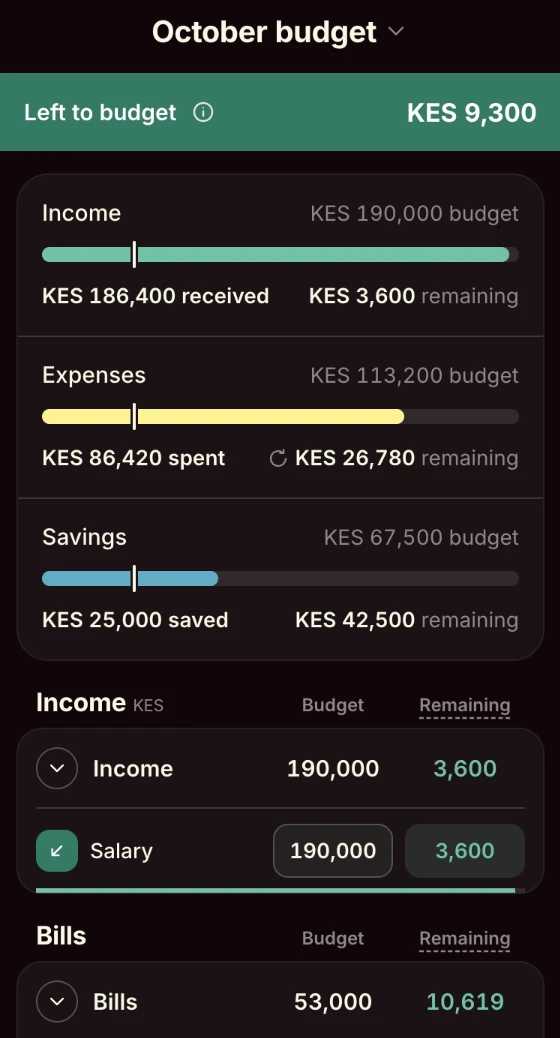
Create a budget that flexes to your needs — and not the other way around — so you can stay focused on the things that matter most.
Nia reads your bank and M-PESA activity and files each transaction into the right category. Review in a tap, and Nia learns from your corrections.
A glance each morning shows how this month's spending tracks against your plan, plus the bills due this week.
Under budget this month? Carry the difference forward and build up to the bigger buys.
Income in, expenses out. Monthly summaries show which way the trend is moving.
Streaming, gym, data bundles. Nia flags recurring charges before they hit.
Bank balances, M-PESA, money market funds, NSE shares, crypto, even your home. One net worth number, no app-hopping.
Prices refresh through the trading day. Look in when you feel like it.
Too much in one stock? Not enough cash set aside? See how balanced you really are.
Add your home or plot with a value estimate. Nia tracks it with the rest.
Explore Nia with sample data before connecting a single account. Like what you see? Start your free trial.
No ads. No selling your data.
You pay for Nia, so Nia works for you, not for advertisers.
[Tweet with a video or screenshot attached. One line is enough.]
[Longer Play Store review, around seven lines: what they used before Nia, how long they have been on it, what changed in their monthly routine, and who they would recommend it to. Swap in a real review once you have one.]
[Tweet, about five lines: someone who switched from spreadsheets or another budgeting app and what Nia did for them in the first week.]
[Play Store review, around six lines: why they were sceptical about paying for a money app, and what won them over.]
[Short tweet, two lines, about the design.]
[Play Store review, around eight lines: from a self-described power user who has tried every budgeting app, naming what works, what still needs polish, and why they are staying anyway.]
[Short tweet, two lines.]
[Play Store review, around ten lines: how budgeting used to feel like a chore, how automatic categorisation and rollovers changed that, how M-PESA tracking fits in, and the moment it finally clicked. This is the longest card in the wall, so give it the strongest story you have.]
[Tweet, about four lines: downloaded yesterday, linked a few accounts, surprised by how fast everything was sorted.]
[Short tweet, two lines.]
[Tweet, three lines: finally one dashboard with every bank, M-PESA and investment account in one place, no spreadsheet needed.]
[Play Store review, around ten lines: a design-minded user on how native and clean the Android app feels, how quickly new features ship, and why they would tell a friend to try it. Long enough to match the tallest card in the middle column.]
[One-line tweet: loving Nia so far.]
[Play Store review, around five lines: switched after years on another app, happy about support that actually replies, and about how little setup it took to get a budget running.]
[Tweet, three lines: an early user saying the app became a home screen fixture within a week, and telling people to go get it.]